What if GitHub bans me tomorrow?
Where does your source code actually live? Not the GitHub URL. Where does it physically exist, in a form you control, the day GitHub stops cooperating? For most teams I’ve worked with, the honest answer is “GitHub, plus whatever happens to be checked out on a few laptops.” The remote is the backup and the backup is the remote, and nobody has tested the day those two stop being the same thing.
That’s a lot of trust to park in one company. We call source code the crown jewels and then keep a single authoritative copy of it, on infrastructure we don’t own, behind a login we don’t control. Plenty of organisations could not actually answer “where is our code if GitHub says no”: they’ve outsourced the question so completely they’ve forgotten it’s a question.
And switching hosts doesn’t answer it either. Codeberg, GitLab, Azure DevOps, Bitbucket, take your pick; you’ve just changed which single landlord holds the keys. The problem was never GitHub specifically. It’s that the one authoritative copy lives somewhere I don’t, run by someone whose terms I agreed to once and can’t renegotiate when it counts.
I don’t think GitHub is going to disappear. But I’ve watched its status page light up more than it used to (the incident history is public, judge for yourself), and that tracks, now that a serious fraction of the world’s code is being fired at it by AI agents around the clock. More load, more surface area, more ways for an ordinary Tuesday to go sideways. “Up almost always” is a different guarantee from “up the day I need it.”
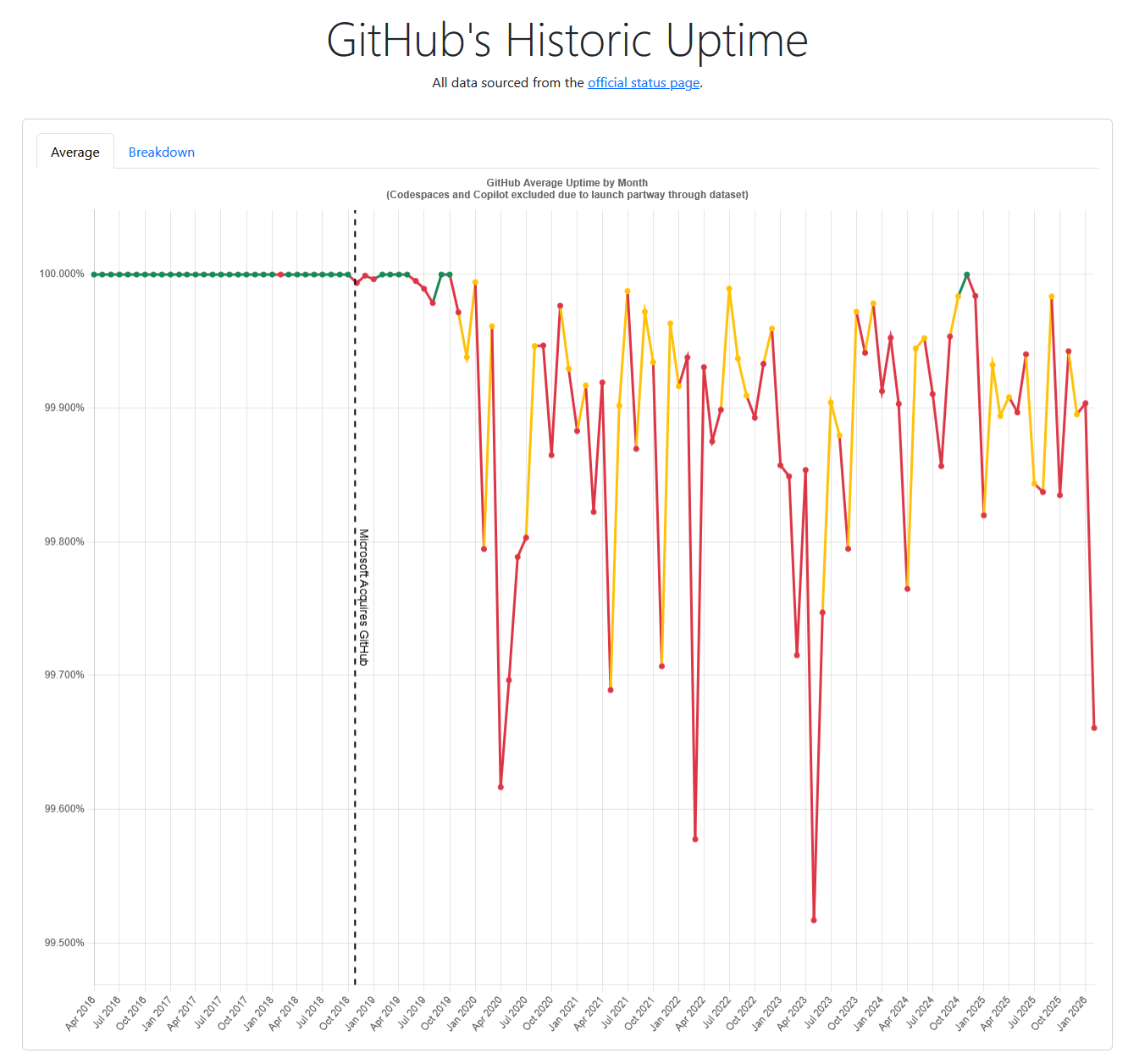
Someone has been plotting GitHub’s monthly uptime from that same status page. The chart’s here. The early years sit flat at the top; the line gets a lot more interesting after 2019. Make of the trend what you will, but it isn’t nothing.
And an outage is the friendly failure. The unfriendly one is losing access for me specifically: a heuristic flags the account, an automated copyright strike pulls a repo, some throwaway comment in some file trips a filter, all decided and enforced at machine speed, with the appeal, if there is one, going to another machine. I’ve no particular reason to think it’ll be me. That isn’t the same as a reason to think it won’t.
I’d rather not find out how recoverable I am the day it happens.
The non-answer: “git is distributed”
The first thing everyone says is “git is distributed, you already have copies.” Sort of. What I actually have, on any given machine, is:
- The branches I happened to check out at some point.
- The tags I happened to fetch.
- A clone that’s stale by however long ago I last
git pull-ed. - Nothing for the repos I haven’t touched in a year but still want to keep.
That’s a working copy, not a backup. The difference is invisible right up until the remote is gone, and then I find out exactly which branches, which tags, which year-old repos I’d been quietly trusting GitHub to remember for me. “I have a clone” and “I have the repo” turn out to be very different sentences.
A git clone --mirror is different: it’s a bare clone with every ref, all
branches, all tags, all notes, the full object graph. Run that for every
repo I own, keep it up to date, and the disk genuinely contains the
repository, not a snapshot of my recent attention.
I didn’t arrive at --mirror from first principles. I’d built almost exactly
this for a client a while back: they needed source code moving out of Azure
DevOps and into an airgapped GitLab, with no path between the two except a
machine that could see both. The job was a systemd timer that did a git clone --mirror onto a server on the connected side, then pushed that mirror across
into the airgapped infrastructure. Once you’ve watched a bare mirror carry a
whole repo across a gap that nothing else can cross, doing the same thing for
my own code is a small leap: the gap is just “GitHub stops cooperating”
instead of an air gap, and the mirror doesn’t much care which one it is.
The tempting answer that’s a trap: self-host Forgejo
The obvious next step is “host your own Forge.” Forgejo on my Kubernetes cluster, push-mirrored from GitHub, full UI for issues and PRs, the works. I almost did this.
The reason I didn’t is the bootstrap loop. The cluster is provisioned from git. The IaC for the cluster is in a repo. The Helm charts and Argo CD applications and image pipelines are in repos. If the Forge that holds those repos lives on the cluster, then the moment the cluster is down I have no cluster, and to bring the cluster back I need the repos that are on the cluster I don’t have.
cluster ──needs──▶ repos ──live on──▶ Forge ──runs on──▶ cluster
   ▲                                                        │
   └────────────────────────────────────────────────────────┘
            down → can't bootstrap → still down
You can paper over this: a second cluster, an external git source for bootstrap only, careful separation of “cluster repos” from “everything else.” But every one of those mitigations is “now I’m running two of the thing I was trying to make simpler.” The Forge stops being a backup and becomes a tier-1 service I have to operate forever, with its own database, its own upgrades, its own backups, its own dependency on the cluster I was hoping to reduce my dependence on.
A self-hosted Forge is a fine answer to a different question (do I want to leave GitHub?) and at some point I probably will stand one up, on a VM or the cluster, just to run it and see. But that’s a thing I’d build because I want a Forge, not because I want a backup. In the backup role it’s all cost: another service to patch, another database to babysit, another thing that’s conveniently down at the exact moment the cluster it lives on is. If all I want is for GitHub to be unable to take my repos with it when it goes, that’s a lot of standing machinery to answer a question a script answers better.
What I actually want
Two properties, in order:
- Availability when GitHub isn’t there. I can do a
git clonefrom somewhere I control, on a machine I own, today, without GitHub being a participant. - Durability against losing the machine that holds (1). Disks fail. Houses burn. NASes get cryptolockered. The copy I rely on cannot be a single copy.
Note what’s not on the list: issues, pull request discussions, releases, wikis, CI history. Those are nice to have. They’re not why I write code, and they’re not what I’d cry over losing. If GitHub disappeared tomorrow, I’d be sad about losing PR threads and fine about losing the rest as long as the code itself was intact.
Drop all of that and the problem gets small. I’m no longer trying to back up GitHub (its issues, its UI, its whole API surface); I’m trying to back up the git data of every repo I can see. That second thing fits in a cron job.
The script
github_mirror is a small
Crystal binary, packaged as a 44 MB Alpine image. One pass:
- Enumerate every repo my token can see, following the GitHub API’s pagination to exhaustion. If enumeration fails, exit non-zero and stop: “I couldn’t list your repos” must never be confused with “you don’t have any repos.”
- For each repo,
git clone --mirroron first sight,git remote update --pruneon every subsequent run. - Write a
mirror-state.jsonrecording per-repo and per-run status, so a monitoring wrapper can tell “everything is fine” from “the token has been dead for three weeks and nobody noticed.” - Exit non-zero if anything failed.
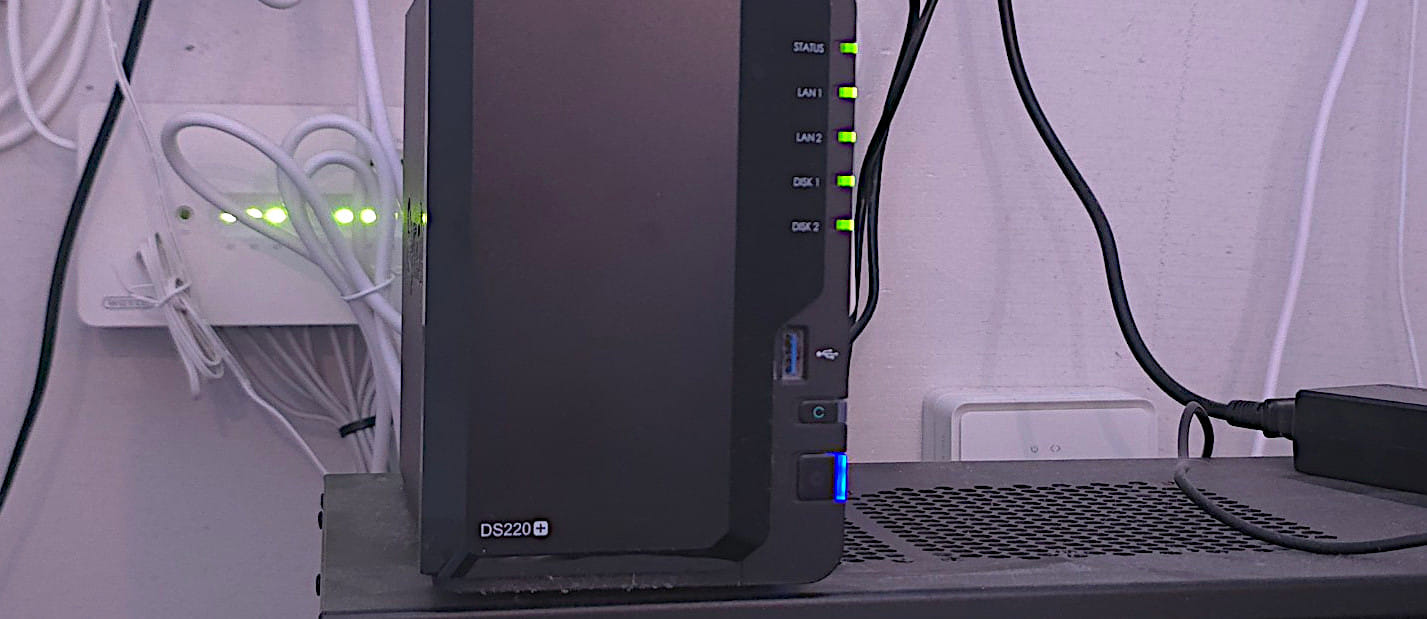
It runs on my NAS, on a cron, against a read-only fine-grained token mounted as a file (never on argv, never on inline env). The token has exactly two scopes: Contents: Read and Metadata: Read. It cannot push. It cannot delete. The blast radius of a leak is “someone gets to read my private repos,” which is bad but bounded.
There’s nothing here that needed Crystal. Bash could clone repos in a loop; Python would have done the API pagination in fewer lines than I did. I reached for Crystal because I like the syntax and it had been a while since I’d written any, and personal tooling is the one place where “because I wanted to” is a good enough reason. The part that isn’t pure indulgence is concurrency: Crystal’s fibers, like Go’s goroutines, make it cheap to run many clones at once. Today the job clones one repo after another and finishes fine, but the slow part is always the cloning, never the enumeration, and if this ever ran for someone with hundreds or thousands of repos that’s exactly the part I’d want to fan out. I haven’t needed to. I just picked a language where needing to later is a small change instead of a rewrite.
A few small choices that matter more than they look:
- Archived repos are kept by default. Archived is exactly the state where I’ve stopped paying attention, which is exactly the state where I most want a backup.
- Forks are skipped by default. They’re someone else’s repo with my fork-point on top; if I cared about the fork-point I’d have branched it.
- A repo that disappears upstream is never deleted locally. If I lose access to GitHub, the tool will fail to list a repo it used to see. The on-disk copy stays put, marked dormant in the state file. The whole point of a mirror is to outlive the remote.
- No issues, no PRs, no releases, no wikis. Git data only. See above re: what I’d actually miss.
That’s it. It’s intentionally boring. Boring is the property I want from something whose job is to be working the day everything else isn’t.
The bit that actually makes it a backup
A mirror on my NAS gives me availability: I can clone from it, today, without GitHub. It does not give me durability. The NAS is one machine in one building, and one machine in one building is one fire away from zero machines anywhere.
Durability means a second copy somewhere the first fire can’t reach. Either way that means an off-site machine: a cheap VM in someone else’s datacentre will do. The only real question is what I put on it, and there are two honest answers.
Option one: run github_mirror again on the VM, pointed straight at GitHub.
The same set-and-forget cron I already trust, a second time, on a box in a
different building. The two copies never touch: each pulls from GitHub on its
own, so a corrupt object or a botched prune on the NAS can’t propagate to the
VM. And the off-site copy is itself a live mirror: if the NAS is gone, I git clone from the VM directly, no restore step and no second tool. What it
doesn’t give me is history or encryption at rest: it’s a plain bare clone on a
disk, current as of the last run and nothing older.
Option two: point restic at the NAS mirror and push encrypted snapshots to
the VM. restic is a backup program: it takes snapshots
of a directory and ships them to a remote of your choosing. Now the off-site copy
is encrypted, deduplicated, and versioned:
if a repo upstream turns to garbage and the NAS dutifully mirrors the garbage,
I can still roll back to the snapshot from before it did. The cost is that this
copy is a copy of the NAS, not of GitHub, so it inherits whatever the NAS got
wrong until I notice, and it’s a restore, not a clone. The day I need it I
restic restore first, then clone.
They fail differently, which is the whole point:
- github_mirror, twice protects me against losing a whole machine: independence and a zero-step recovery.
- restic protects me against silently mirroring a mistake: encryption and a rewind button.
Right now I run neither, just the NAS mirror, which is availability without durability, which is half a backup. I keep going back and forth on which leg to add. Option one is less to operate and recovers in a single clone; option two is the one I’d trust against my own mistakes, not only GitHub’s. The honest answer is probably both eventually, since they fail in different places, but the move that matters is getting off a single copy at all, and that’s the decision I’m actually sitting on.
today:       GitHub ──mirror──▶ NAS   (availability only, one copy, one building)

option one:  GitHub ──mirror──▶ NAS
                  └───mirror──▶ VM    (second live mirror; independent, clone-direct)

option two:  GitHub ──mirror──▶ NAS   (encrypted, versioned; restore-then-clone)
                         └──restic──▶ VM
What I’d do on the day it happened
If GitHub locked me out tomorrow morning, here’s the actual sequence:
- Stop trying to log in. Whatever flagged me will not be un-flagged by me refreshing the page.
ssh nasand confirmmirror-state.jsonshows a recentlast_run_ok: true. If it doesn’t, that’s the first real problem, not the lockout.git clone /mnt/mirrors/Lillevang/<whatever>.gitto whatever machine I need it on. Done. The code is back.- Stand up a Forge, now, when I actually need one, with the data
already in hand and no bootstrap loop because I’m not putting it on the
cluster I’m trying to bring back up. Probably Forgejo on a small VPS,
git push --mirrorfrom the NAS into it, point new clones at it. - Start over with GitHub or don’t. That’s a separate decision from whether my code survives.
The point of the tool is that step 3 is trivial. Everything else in that list is annoying but not destructive. The thing that would be destructive is if step 3 didn’t work, and I only found out at step 3.
What I’d tell past-me
The version of this I almost built was “Forgejo on the cluster, mirror into it, problem solved.” It would have taken a weekend, looked great in a diagram, and quietly made the cluster un-rebuildable without the cluster. The version that actually solves the problem is a hundred lines of Crystal, a cron job, and a separate backup tool I already trusted.
Pick the boring one. The clever one is what the next incident will be about.